Use your own API keys for unlimited AI features. Full control, direct billing,
and access to the latest AI models from OpenAI, Anthropic, Google, and more.
BYOK (Bring Your Own Key) is Eristotle's technical tier that lets you use your own API keys
from leading AI providers. Instead of using our shared infrastructure, you connect directly
to OpenAI, Anthropic, Google, and other providers using your personal API keys.
💰
Direct Billing
Pay providers directly based on your actual usage. No markup, no hidden fees.
♾️
Unlimited Usage
No monthly voice minute limits. Use AI features as much as you want.
🎯
Model Selection
Choose specific AI models for different features. GPT-4o for chat, Claude for insights, Gemini 2.5 Flash Lite for sentiment tagging, and so on.
🛡️
Apple Intelligence Fallback
If your API key runs out of credits, Eristotle falls back to on-device Apple Intelligence.
Getting Started
Setting up BYOK in Eristotle is straightforward. Here's what you'll need:
1
Subscribe to BYOK
BYOK is available for $3/month or $30/year (save 17%). Go to Settings → Subscription in Eristotle and select the BYOK tier.
2
Create API Keys
Sign up for accounts with your preferred AI providers (OpenAI, Anthropic, Google, etc.) and generate API keys. See detailed instructions below.
3
Add Keys to Eristotle
Go to Settings → BYOK Features → API Keys and enter your API keys. Eristotle validates them automatically.
4
Configure Models (Optional)
Go to Settings → BYOK Features → Model Settings to choose which AI models to use for different features.
💡
Pro Tip: You only need one API key to get started! OpenAI is the most versatile choice
since it powers text chat, sentiment analysis, insights, and voice transcription.
🤖
OpenAI Setup
OpenAI models supported by Eristotle include GPT-5.1, GPT-5 models, GPT 4.1 models, GPT-4o models, o4, o3, and Whisper (for voice transcription).
This is the most important key for full Eristotle functionality.
Create Your OpenAI API Key
Create an OpenAI account
Go to openai.com/api and sign up or log in (API Platform).
Add payment method
Navigate to Settings → Billing and add a credit card. OpenAI requires payment info before API access.
Add credits
Purchase API credits. We recommend starting with $5-20 to test. You can enable auto-recharge later.
Generate API key
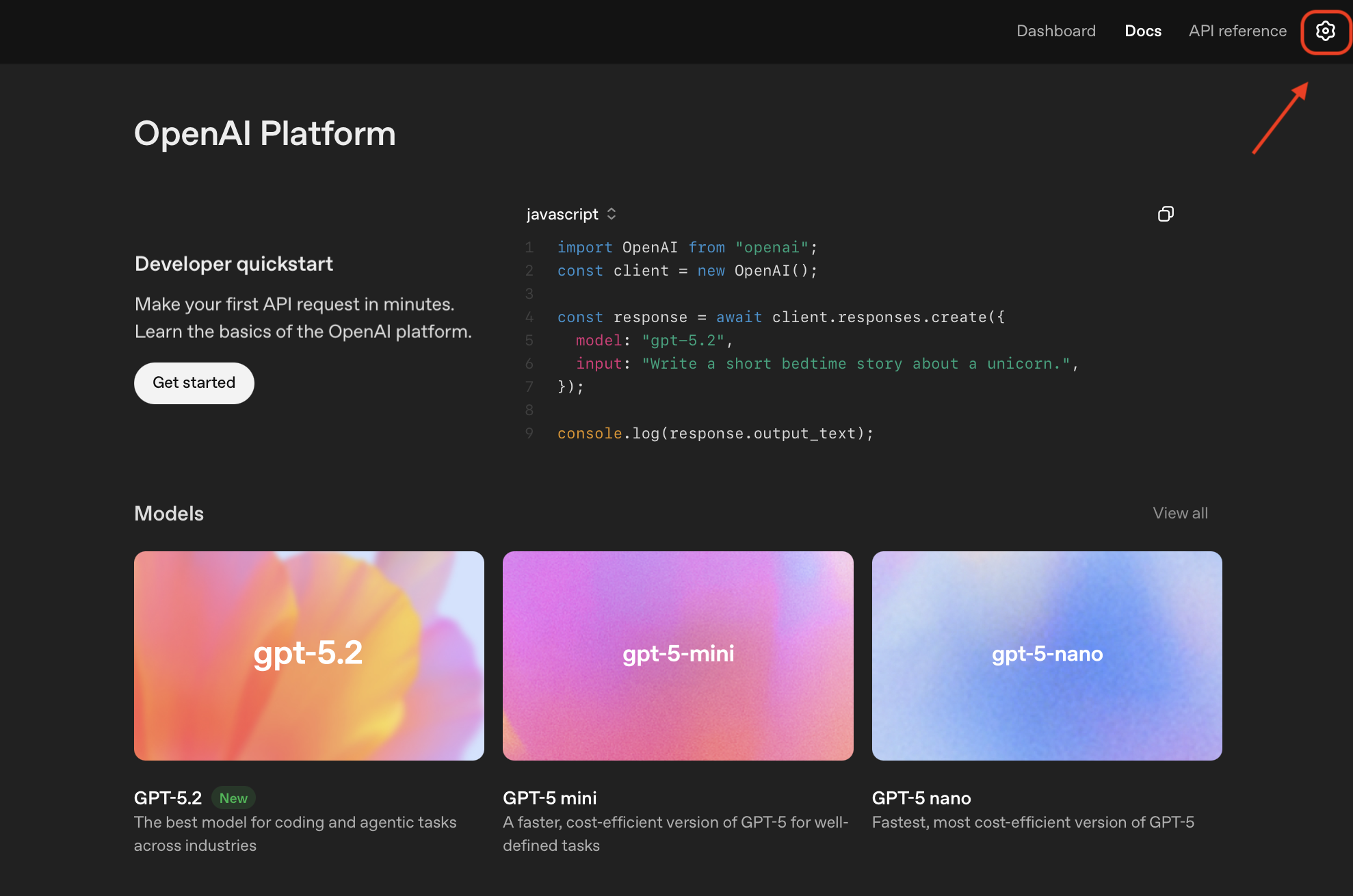
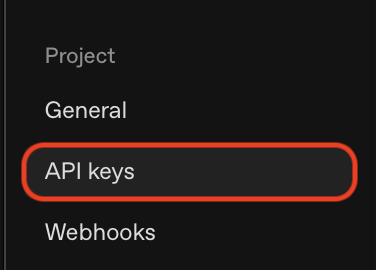
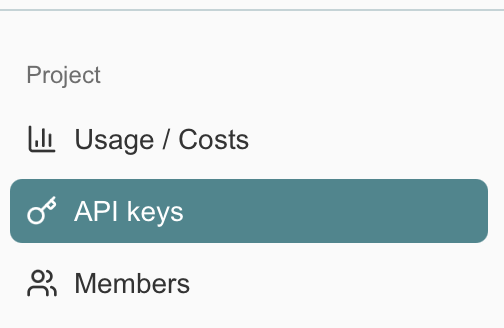
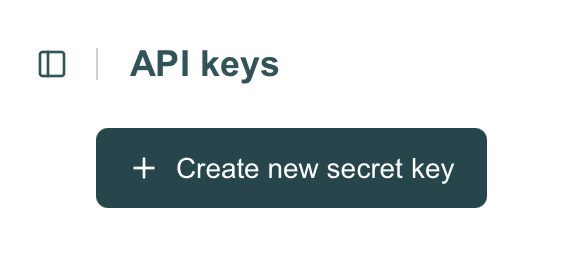
Click the gear icon. On the left, in the navigation menu Projects, select the API Keys section and click "Create new secret key". Name it "Eristotle" for easy reference.
Copy the key immediately
OpenAI only shows the key once! Copy it and add it to Eristotle right away. If you make a mistake, you can always delete the key and create a new one.
🔍 Click to zoom
Click the gear icon in the top-right to access settings
🔍 Click to zoom
Select "API Keys" from the Project menu
🔍 Click to zoom
Click "Create new secret key"
Key Formatsk-proj-xxxxxxxxxxxxxxxxxxxxxxxxxxxxxxxxxxxxxxxxStarts with "sk-" followed by alphanumeric characters
Recommended Models
GPT-5 nanoFast, cost-effective for most tasks~$0.05 per 1M input tokens / $0.4 per 1M output tokens
GPT-5 miniBest quality for chat and insights~$0.25 per 1M input tokens / $2 per 1M output tokens
WhisperVoice transcription (automatic)~$0.006 per minute
⚠️
Set a spending limit! Go to OpenAI's Billing → Limits and set a monthly budget
(e.g., $5-10) to avoid unexpected charges.
🧠
Anthropic (Claude) Setup
Anthropic provides Claude models, known for nuanced, thoughtful responses and excellent
reasoning capabilities. Claude Sonnet 4.5 is great for journaling insights.
Free tier available! Google offers free API access with rate limits.
Great for testing before adding billing.
🔀
OpenRouter Setup
OpenRouter is a unified API gateway that gives you access to models from OpenAI, Anthropic,
Google, and many other providers using a single API key. This is perfect if you want the
flexibility to use different models without managing multiple API keys.
⭐
Recommended for BYOK subscribers: OpenRouter is our top recommendation because
you can access 300+ models from 60+ providers with a single API key. Track all your usage
in one dashboard, set spending limits per key, and easily switch between models without
managing multiple accounts.
💡
One key, many models: With OpenRouter, you can access GPT-5, Claude,
Gemini, DeepSeek, Grok, and hundreds more using just one API key. Perfect for experimenting
with different models or finding the best one for your journaling style.
Create Your OpenRouter API Key
Create an OpenRouter account
Go to openrouter.ai and sign up or log in. Click "Get API Key" on the homepage.
Add credits
Navigate to the billing section and add credits to your account. OpenRouter offers pay-as-you-go pricing with no minimum. We recommend starting with $5-10.
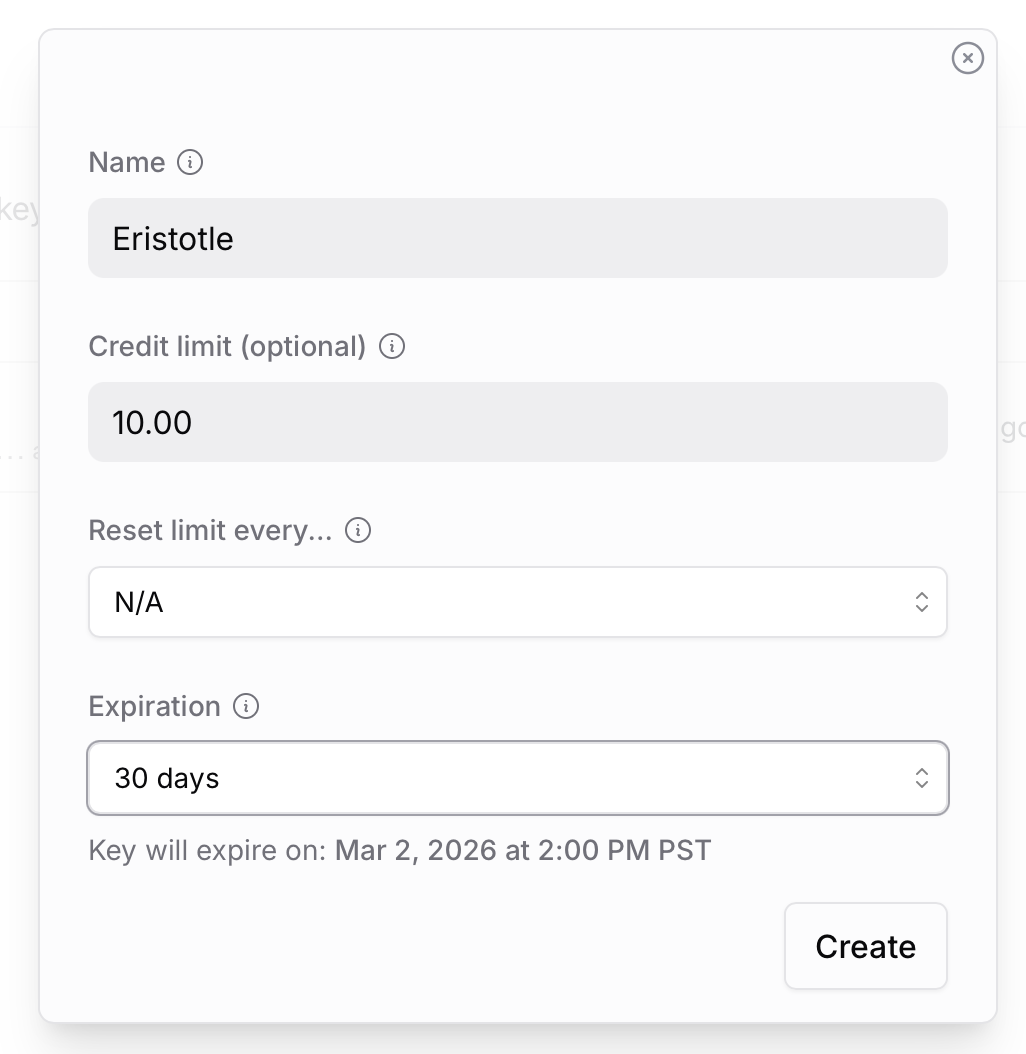
Name it "Eristotle" for easy reference. Optionally set a Credit limit (e.g., $10) to control spending. You can also set an expiration date for added security.
Copy the key
Copy your API key and add it to Eristotle in Settings → BYOK Features → API Keys → OpenRouter.
🔍 Click to zoom
Click "Get API Key" on the OpenRouter homepage
🔍 Click to zoom
Click "Create API Key" in your settings
🔍 Click to zoom
Name your key and optionally set a credit limit
Key Formatsk-or-v1-xxxxxxxxxxxxxxxxxxxxxxxxxxxxxxxxxxxxxxxxxxxxxxxxxxxxxxxxStarts with "sk-or-v1-" followed by alphanumeric characters
How OpenRouter Works
When you select an OpenRouter model in Eristotle, the model name includes the provider prefix
(e.g., openai/gpt-5-mini or anthropic/claude-sonnet-4.5). OpenRouter
routes your request to the appropriate provider automatically.
Recommended Models
OpenRouter provides access to 300+ models from 60+ providers. Here are the models available in Eristotle:
Chat & Insight Models
openai/gpt-5-miniBest balance for chat$0.25/M in, $2/M out
openai/gpt-5.2Latest OpenAI flagship$1.75/M in, $14/M out
openai/gpt-5.1Strong reasoning$1.25/M in, $10/M out
openai/gpt-4.1Strong reasoning, 1M context$2/M in, $8/M out
openai/gpt-4.1-miniFast and affordable$0.40/M in, $1.60/M out
openai/gpt-4o-miniBudget-friendly$0.15/M in, $0.60/M out
anthropic/claude-sonnet-4.5Best for insights & sentiment$3/M in, $15/M out
anthropic/claude-haiku-4.5Fast emotion tagging$1/M in, $5/M out
google/gemini-3-flash-previewLatest Gemini, thinking mode$0.50/M in, $3/M out
google/gemini-2.5-flashCost-effective, reliable$0.30/M in, $2.50/M out
google/gemini-2.5-proStrong reasoning$1.25/M in, $10/M out
deepseek/deepseek-v3.2Open source leader, very cheap$0.25/M in, $0.38/M out
x-ai/grok-4.1-fastFast Grok, 2M context$0.20/M in, $0.50/M out
minimax/minimax-m2-herEmotional intelligence$0.30/M in, $1.20/M out
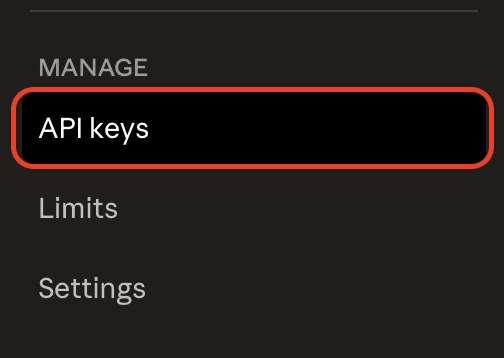
After signing in, navigate to your API dashboard and select API keys under the Project section.
Generate API key
Click "Create new secret key" and name it.
Copy and add to Eristotle
Add the key in Settings → BYOK Features → API Keys → Voyage AI.
🔍 Click to zoom
Select "API keys" under the Project section
🔍 Click to zoom
Click "Create new secret key"
Key Formatpa-xxxxxxxxxxxxxxxxxxxxxxxxxxxxxxxxStarts with "pa-" followed by alphanumeric characters
Recommended Model
Voyage 3.5 LiteFast, efficient embeddings~$0.02 per 1M tokens
💡
When to use Voyage AI: If you have a large journal history (1000+ entries)
and want faster, more accurate Smart Search results. Otherwise, on-device embeddings work great.
🎙️
ElevenLabs Setup
ElevenLabs powers Eristotle's real-time AI Voice Chat feature with natural, expressive voices.
Good news: Eristotle sets up your voice agent automatically when you add your API key—no manual configuration needed!
✨
Auto-Agent Setup: When you add your ElevenLabs API key and tap "Set Up,"
Eristotle automatically creates and configures a voice agent for you. The agent is pre-configured
with the right voice, personality, and tools to search your journal entries during conversations.
This feature is available to both BYOK and Premium subscribers.
Free tier offers limited minutes. Creator ($22/month) or Pro ($99/month) recommended for regular use.
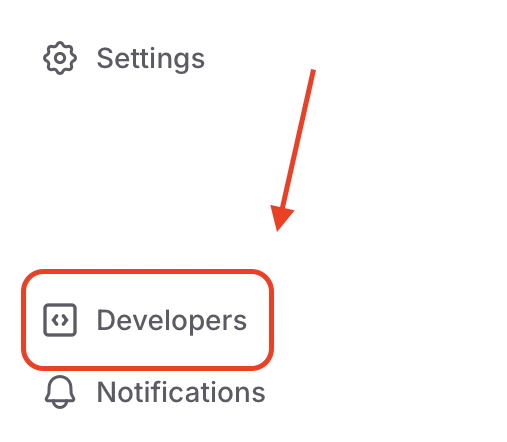
Navigate to Developers
In the left sidebar, click Developers to access API settings.
Create your API key
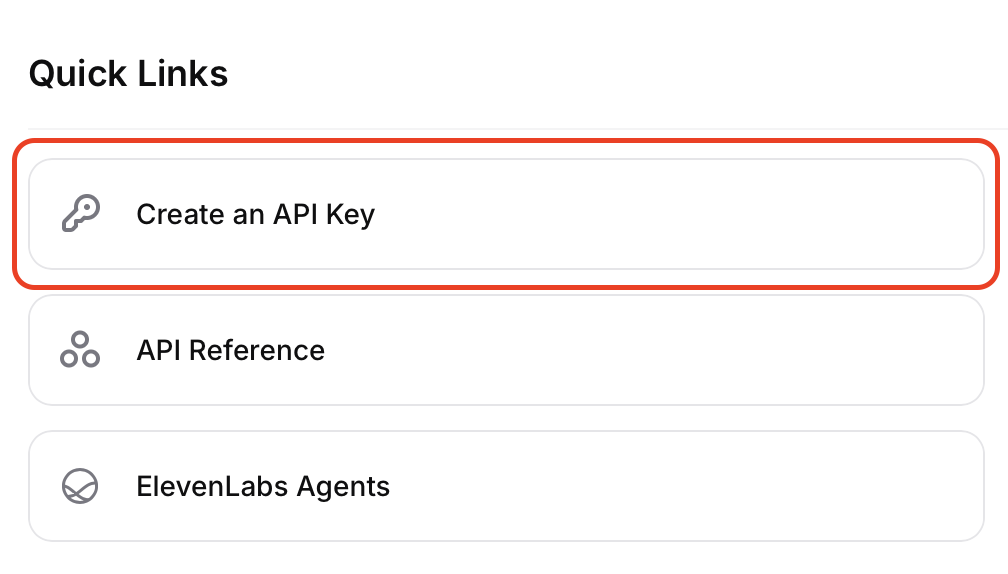
Click "Create an API Key" under Quick Links. When creating the key, ensure you enable the following permissions:
Text-to-Speech: Powers AI voice responses in Text Chat
Conversational AI (Agents): Required for the Voice Chat feature
History: Allows Eristotle to retrieve and sync conversation audio
User: Required for API authentication and account validation
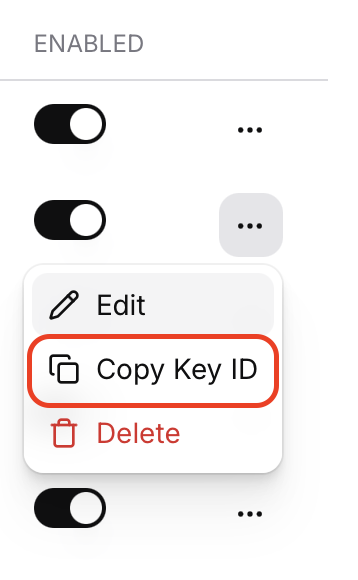
After creating, click the ellipses on your key and select "Copy Key ID".
🔍 Click to zoom
Click "Developers" in the sidebar
🔍 Click to zoom
Click "Create an API Key" under Quick Links
🔍 Click to zoom
Click the ellipses and select "Copy Key ID"
Step 2: Add API Key to Eristotle
Open BYOK Settings
In Eristotle, go to Settings → BYOK Features → API Keys.
Enter your API key
Paste your ElevenLabs API key in the ElevenLabs field.
Tap "Set Up"
Eristotle will automatically create a voice agent configured for your selected avatar (Eris or Talen). The agent includes journal search capabilities out of the box.
Start a Voice Call
You're ready! Tap the phone icon in the chat view to start a voice conversation.
🔄
Switching avatars? When you change between Eris and Talen, Eristotle automatically
updates your agent's voice to match. No manual reconfiguration needed.
API Key ID FormatxxxxxxxxxxxxxxxxxxxxxxxxxxxxxxxxxxxxThe API key ID is a string of alphanumeric characters.
Custom Avatar: Use Your Own Agent
If you select the Custom avatar in Eristotle, you can use your own ElevenLabs agent instead
of the auto-provisioned one. This gives you full control over voice selection, personality, and configuration.
⚠️
Custom agents require manual setup: When using a custom avatar, you must create
your own agent in the ElevenLabs dashboard and enter the Agent ID in Eristotle. You'll also need
to configure the agent's tools and system prompt manually.
Creating a Custom Agent
Go to Agents
In ElevenLabs, navigate to Agents in the left sidebar under the Configure section.
Create new agent
Click the + button next to Agents and choose a template or start from scratch.
Configure your agent
Set up the following:
Voice: Choose any voice from the ElevenLabs library, including cloned voices
First message: A warm greeting like "Hi! How are you feeling today?"
System prompt: Define personality and include tool usage instructions (see below)
Enable authentication
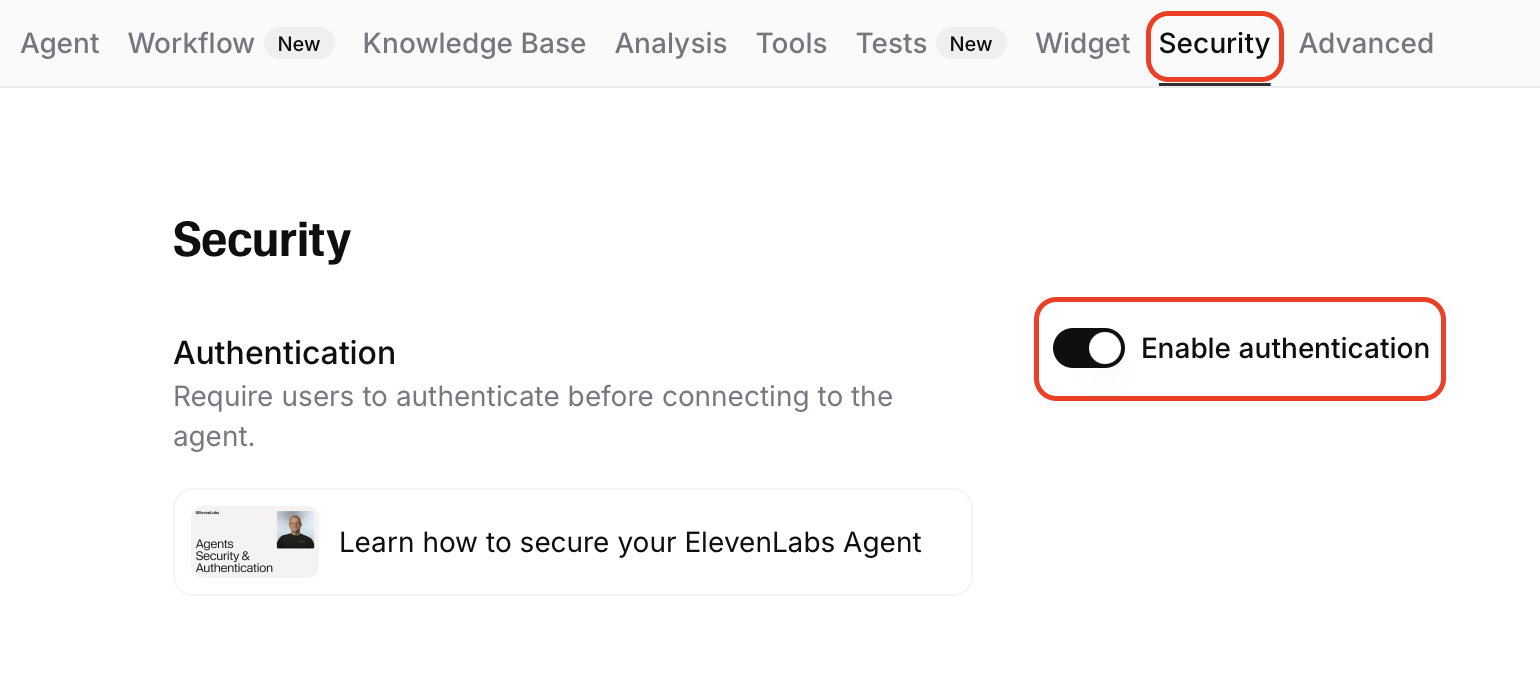
Go to the Security tab and toggle on "Enable authentication". This is required for the agent to work with Eristotle.
Copy the Agent ID
After saving, find your Agent ID in the agent settings. It looks like: agent_xxxxxxxxxxxxxxxxxx
Enter Agent ID in Eristotle
Select the Custom avatar, then go to Settings → BYOK Features → API Keys → ElevenLabs and enter your Agent ID.
🔍 Click to zoom
Go to Security tab and enable authentication for your agent
Agent ID Formatagent_xxxxxxxxxxxxxxxxxxUUID format with hyphens
Required: System Prompt Tool Instructions
For your custom agent to search journal entries and recall past conversations, you must include
tool usage instructions in your agent's system prompt. Without these, the agent won't know when or how to use
the journal search capabilities.
📝
Add this to your system prompt: Copy and paste the following tool usage section
into your agent's system prompt. This tells the agent when to search your journal and conversation history.
System Prompt Tool Instructions
# Tool Usage:
Use `search_journal` when a user asks about past experiences, emotions, progress, or specific events they've written about in their journal.
Example: "How have I been feeling about work lately?" or "What did I write about my mom?"
Returns: Date, emotion, content, and therapeutic insights.

Use `search_memories` when a user asks about our previous conversations, advice you've shared, or recurring topics we've discussed.
Example: "What did we talk about last time?" or "Remind me of that advice you gave me about stress."
Returns: Date, source, and conversation content.
Adding Journal Retrieval Tools
In addition to the system prompt instructions, you need to add client tools to your agent.
These are special functions that allow the agent to request information from Eristotle during the conversation.
💡
What are client tools? Client tools let your AI agent trigger actions on your device.
When you ask "What did I write about last week?" the agent calls the search_journal tool,
and Eristotle searches your entries and returns the results to the conversation.
Learn more →
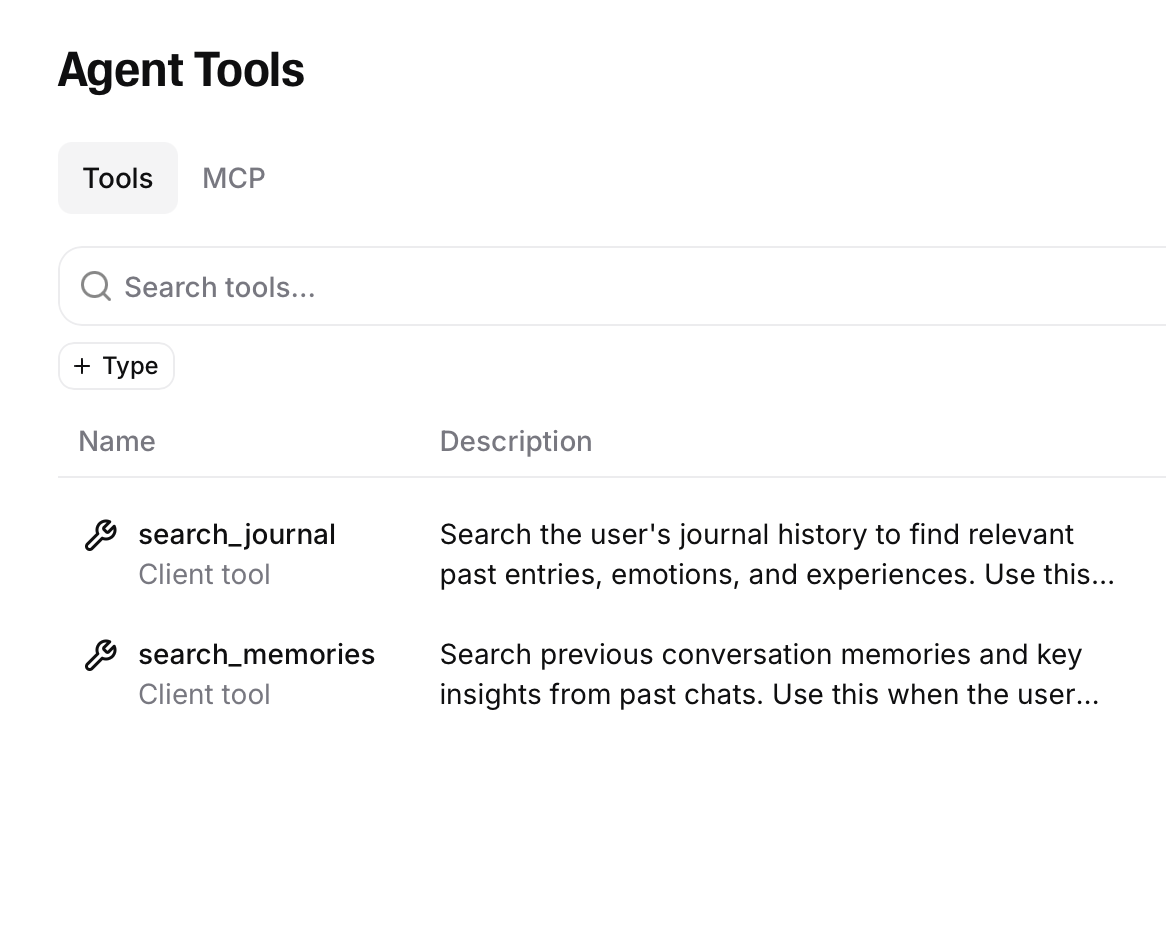
Eristotle supports two client tools:
📖
search_journal
Searches your journal entries for relevant past experiences, emotions, and thoughts. Use when you want your AI companion to have context about what you've written.
💭
search_memories
Recalls key insights and memories from previous AI conversations. Use when you want continuity between Voice Call sessions.
Adding the search_journal Tool
Open your agent's Tools settings
In ElevenLabs, go to your agent and click the Tools tab.
Add a new Client tool
Click Add Tool and ensure the Tool Type is set to Client.
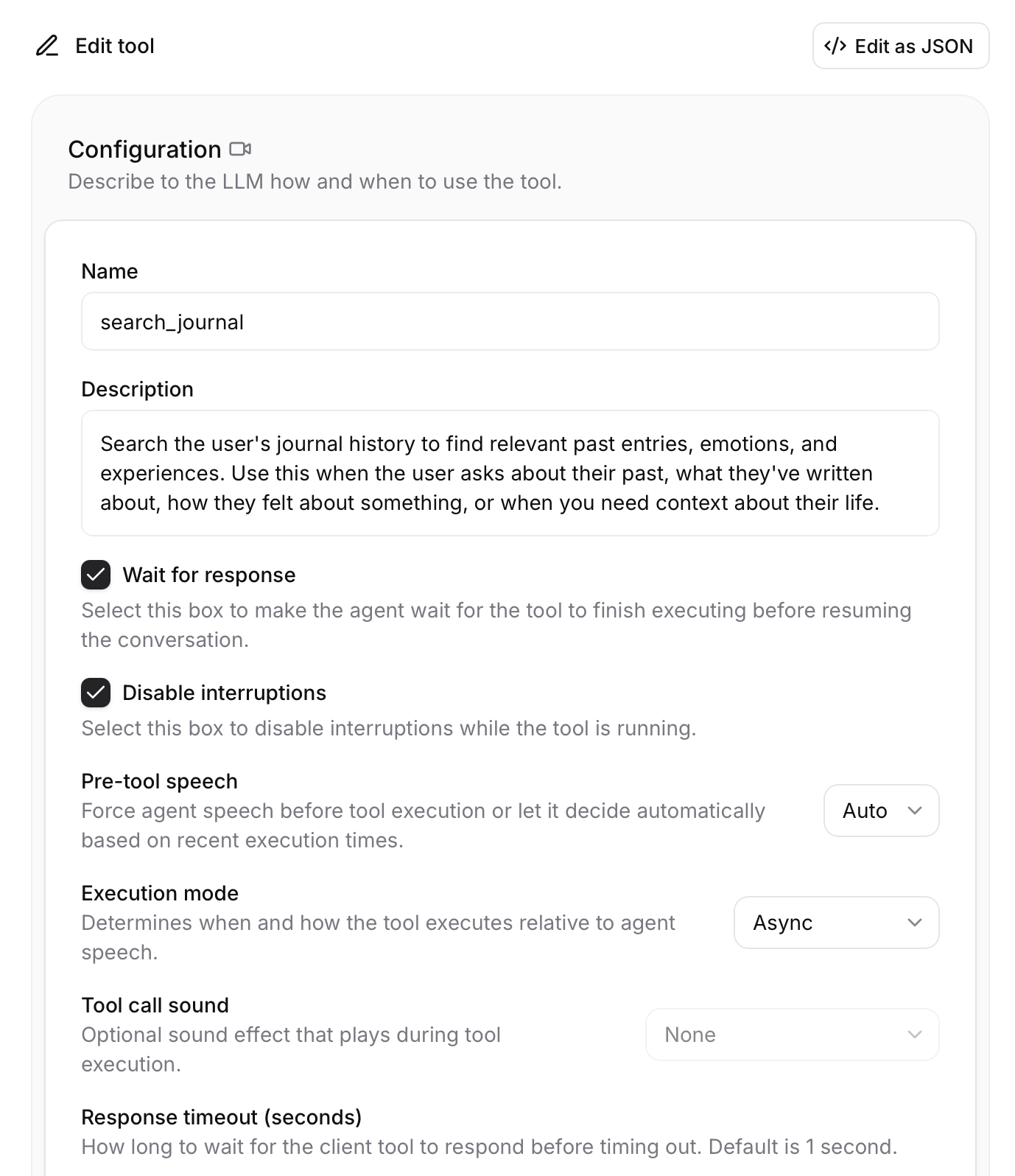
Configure the tool
Enter the following settings:
Namesearch_journal
DescriptionSearch the user's journal history to find relevant past entries, emotions, and experiences. Use this when the user asks about their past, what they've written about, how they felt about something, or when you need context about their life.
Enable required options
Check Wait for response and Disable interruptions. Set Execution mode to Async.
Add the query parameter
Click Add Parameter and configure:
Identifierquery
Data TypeString
RequiredYes
DescriptionThe search query
Save the tool
Click Save to add the tool to your agent.
Adding the search_memories Tool
Add another Client tool
Click Add Tool again with Tool Type set to Client.
Configure the tool
Enter the following settings:
Namesearch_memories
DescriptionSearch previous conversation memories and key insights from past chats. Use this when the user references something they told you before or asks about previous conversations.
Enable required options
Check Wait for response and Disable interruptions. Set Execution mode to Async. This tool has no parameters.
Save the tool
Click Save to add the tool to your agent.
🔍 Click to zoom
Configure the search_journal tool with these settings
🔍 Click to zoom
Both client tools added to your agent
⚠️
Tool names must match exactly! The tool names (search_journal and search_memories)
are case-sensitive and must be spelled exactly as shown for Eristotle to recognize them.
Advanced: Import via JSON
If you prefer, you can use ElevenLabs' "Edit as JSON" feature to import these tools directly. Click Edit as JSON in the tool configuration and paste the relevant JSON:
search_journal
{
  "type": "client",
  "name": "search_journal",
  "description": "Search the user's journal history to find relevant past entries, emotions, and experiences. Use this when the user asks about their past, what they've written about, how they felt about something, or when you need context about their life.",
  "disable_interruptions": true,
  "execution_mode": "async",
  "expects_response": true,
  "response_timeout_secs": 10,
  "parameters": [
    {
      "id": "query",
      "type": "string",
      "description": "The search query",
      "required": true
    }
  ]
}
search_memories
{
  "type": "client",
  "name": "search_memories",
  "description": "Search previous conversation memories and key insights from past chats. Use this when the user references something they told you before or asks about previous conversations.",
  "disable_interruptions": true,
  "execution_mode": "async",
  "expects_response": true,
  "response_timeout_secs": 10,
  "parameters": []
}
Optional: Custom Voice ID
If you want to use a specific voice (including cloned voices) for AI responses in text chat, you can override the agent's
default voice by entering a Voice ID in Eristotle. Find Voice IDs in
Voices → Voice Library in ElevenLabs.
Model Selection Guide
Once you've added API keys, you can choose which models to use for different features.
Go to More → Model Settings in Eristotle.
Feature-to-Model Recommendations
💬
Text Chat
Your main conversation experience. Use the best model you're comfortable paying for.
Best: Claude Sonnet 4.5Budget: Gemini 3 Flash
💡
Insight Generation
Weekly themes and patterns. Needs good reasoning but runs less frequently.
Best: GPT-5.1Budget: GPT-4.1 mini
❤️
Sentiment Analysis
Emotion detection runs on every entry. Use a fast, cheap model.
Best: GPT-5.1Budget: GPT-4.1
🎭
Emotion Tagging
Quick classification task. Fastest model works fine.
Best: Claude Haiku 4.5Budget: GPT-5 mini
Available Models Reference
Eristotle is optimized to work with many models from leading AI companies. The team strives to ensure that new models are compatible with Eristotle's AI features and are available to users shortly after release. Below are the specific models currently available for selection in the app (as of December 2025).
OpenAI
GPT-5 Series
GPT-5.2, 5.1, 5
GPT-5 Pro
GPT-5 mini, 5 nano
GPT-4 Series
GPT-4.1, 4.1 Mini, 4.1 Nano
GPT-4o, 4o Mini
GPT-4 Turbo
Reasoning (o-series)
o4-mini
o3, o3-mini
Other
Whisper (Transcription)
Text Embedding 3 (Small/Large)
Anthropic (Claude)
Claude 4.5
Claude Opus 4.5
Claude Sonnet 4.5
Claude Haiku 4.5
Claude 4.1
Claude Opus 4.1
Google Gemini
Gemini 3
Gemini 3 Flash (Preview)
Gemini 2.5
Gemini 2.5 Pro
Gemini 2.5 Flash
Gemini 2.5 Flash Lite
Gemini 2.0
Gemini 2.0 Flash
Gemini 2.0 Flash Lite
Other
Gemini Embedding
Voyage AI
Embeddings
Voyage 3.5 Lite
Voyage 4 Lite
Troubleshooting
"Invalid API Key" error
Make sure you copied the entire key without extra spaces
Check that the key hasn't been revoked or expired
Verify you have billing enabled on the provider's platform
Some providers require API access to be explicitly enabled
"Rate Limited" or "Insufficient Credits" error
Add more credits to your provider account
Check your usage dashboard for spending
Consider upgrading your plan for higher limits
Google Gemini's Free Tier has strict rate limits; for a more reliable and consistent experience, a paid plan is recommended
Eristotle will fall back to Apple Intelligence automatically
AI responses are slow
Try switching to a faster model (GPT-5 mini, Gemini 2.5 Flash Lite)
Check your internet connection
The provider may be experiencing high load, especially with new and popular models. You can switch models or try again later.
Voice Chat not working
Verify your ElevenLabs API Key is entered and tap "Set Up" to provision the agent
Check that your ElevenLabs plan includes Conversational AI
Verify that your key has the correct permissions (Conversational AI, Text-to-Speech, History, User)
For Custom avatars: Ensure you've entered your own Agent ID
For Custom avatars: Enable authentication in the Security tab for your agent—Eristotle requires this to connect
For Custom avatars: Add the tool usage instructions to your agent's system prompt for journal search to work
How do I check my usage?
OpenAI: platform.openai.com → Usage
Anthropic: console.anthropic.com → Usage
Google: aistudio.google.com → API quotas
ElevenLabs: elevenlabs.io → Usage
🤝
Still need help?
We understand that setting up your own API keys can be technical and sometimes frustrating.
If you've followed the steps above and are still running into issues, we're here to guide you through it.